
Return Not in Hand Claims Management
Marketplace status can show a return as delivered while your warehouse never receives it. We match reverse AWBs, check proof of delivery against warehouse records, and manage eligible cases through to verified credit. Eligibility depends on channel policy, evidence, contract terms and filing windows.
The problem
Where claims stall
01
Delivered on the marketplace, not in your warehouse
A platform or courier status can say a return was delivered when no receipt exists in your warehouse. The item is still unaccounted for, and the gap is easy to overlook.
02
Expected returns that never arrive
A return is created but no receipt follows, or its status conflicts with warehouse records. Someone has to track each case, check the return window and decide whether it is a dispute.
03
Evidence and deadlines are easy to miss
Reverse AWB records, courier scans and proof of delivery sit in different systems. Filing windows differ by channel, so late or missing evidence can make a case ineligible.
What we handle
What we handle
- Returns shown as delivered by the marketplace or courier, with no matching warehouse receipt
- Expected returns with no receipt inside the applicable return window
- Reverse AWB matching between return dispatches and warehouse inbound records
- Review of proof of delivery and courier tracking events, where the channel provides them
- Case files prepared for eligible claims, filed through authorized workflows, with follow-up and escalation
Return in Hand means the warehouse physically received a return but it failed QC. Return Not in Hand (RNIH) means the expected return has not been received or its delivery status conflicts with warehouse records. RNIH needs different evidence and a different dispute workflow. For Return in Hand cases, see our SPF (marketplace seller-protection and reimbursement claim) page: SPF claim management.
Limits: Eligibility depends on channel policy, evidence, contract terms and filing windows. Not every missing return is recoverable, and your team may need to approve submissions or provide portal access.
How it works
From discrepancy to verified recovery
1
Connect
- Technology
- Ingest marketplace return status, reverse AWB and courier tracking data, and warehouse inbound receipts.
- Managed team
- Agree data access, source-of-truth records, SLAs and who owns each exception.
2
Reconcile
- Technology
- Match reverse AWBs to order and return IDs. Flag returns marked delivered, or expected, with no matching warehouse receipt.
- Managed team
- Confirm each flagged return against warehouse records. Drop items that were received or are still in transit.
3
Validate
- Technology
- Pull proof of delivery and courier scan history. Assemble the evidence set and check it against the return window.
- Managed team
- Review evidence, eligibility under channel policy and the claim category. Confirm the filing window before submission.
4
File & pursue
- Technology
- Organize case files with AWB, proof of delivery and receipt references, and track ticket status where the channel supports it.
- Managed team
- Submit eligible cases through the authorized process, respond to queries, rework rejected files and escalate to the marketplace account manager where the agreement allows. Where a channel routes reimbursement through its own programme, routing is confirmed per case.
5
Verify credit
- Technology
- Match reimbursed amounts to payouts and settlement records.
- Managed team
- Report identified, validated, filed, approved and credited amounts separately. Close the ledger entry, or record why it stays open.
Division of work
What ForceSight automates vs what your specialist handles
ForceSight technology
- Matches reverse AWBs to order, return and warehouse records
- Flags returns with delivery-status conflicts
- Organizes evidence and case files, and tracks case status
- Calculates value differences for each open exception
Your claims specialist
- Confirms which flagged returns are valid exceptions
- Checks eligibility, claim category and filing route under channel rules
- Submits cases, follows up with platform teams, and handles rejections and escalations
- Reconciles approved amounts to actual credits
Getting started
What we need from you
- Marketplace return and status data, or portal access where the channel process requires it
- Reverse AWB and courier tracking records for returned shipments
- Warehouse inbound logs and QC or receipt records
- Proof of delivery from the courier or marketplace, where available
- Order and return IDs
- A clear agreement on who identifies missing returns first: ForceSight through reverse AWB matching, or your warehouse through an exception list
- Named approvers for submissions, and escalation contacts
Ready to talk through your return volumes? Schedule a Call
The CFO view
Recovery ledger
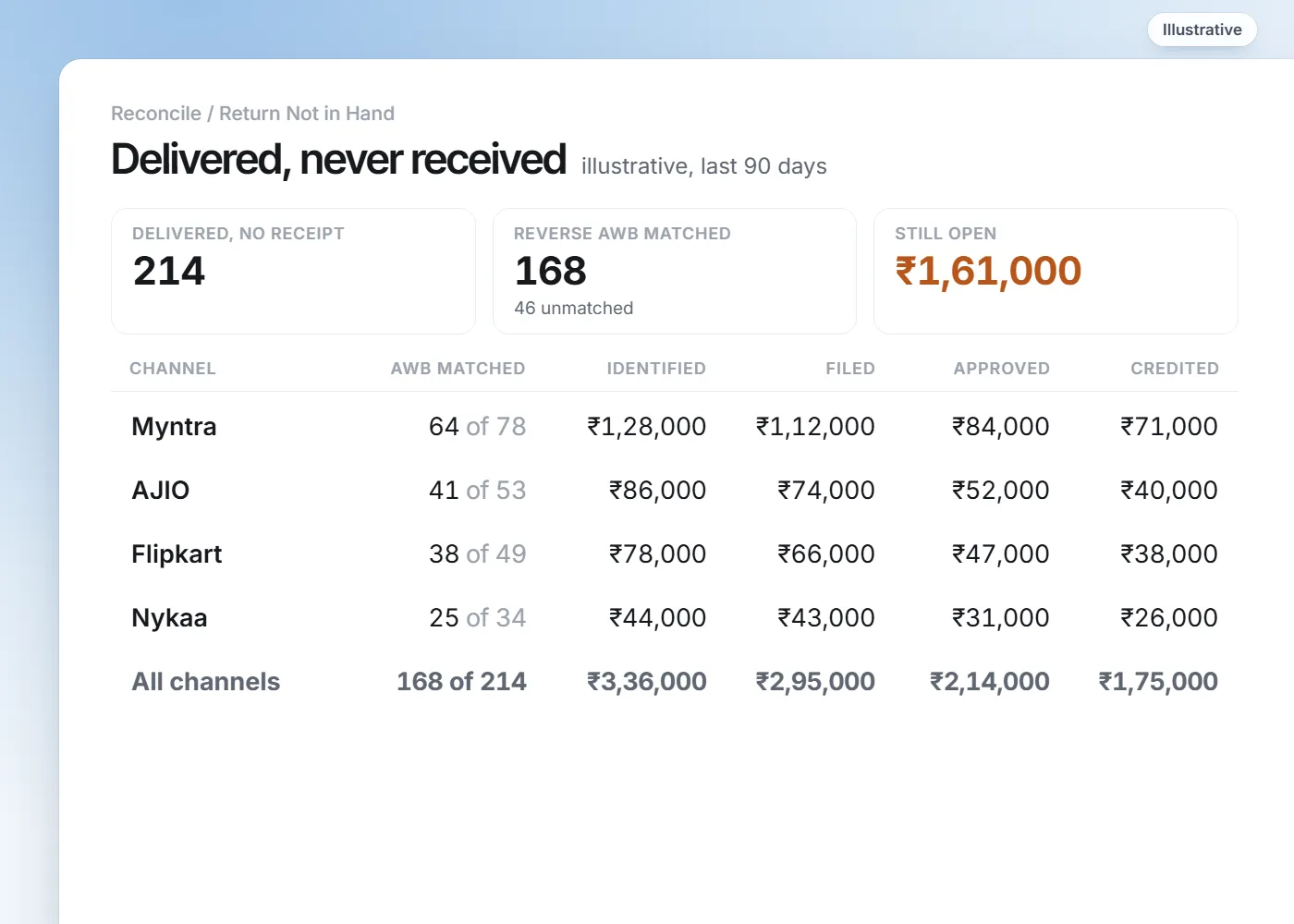
Example data. The ledger lists returns marked delivered with no warehouse receipt, by channel. It shows how many matched a reverse AWB and the amounts at each stage: identified, filed, approved and credited. Approved amounts stay separate from credits actually received, so a closed case without reimbursement is not counted as recovered.
See the numbers as a table
| Channel | AWB matched | Unmatched | Identified | Filed | Approved | Credited | Open |
|---|---|---|---|---|---|---|---|
| Myntra | 64 | 14 | ₹1,28,000 | ₹1,12,000 | ₹84,000 | ₹71,000 | ₹57,000 |
| AJIO | 41 | 12 | ₹86,000 | ₹74,000 | ₹52,000 | ₹40,000 | ₹46,000 |
| Flipkart | 38 | 11 | ₹78,000 | ₹66,000 | ₹47,000 | ₹38,000 | ₹40,000 |
| Nykaa | 25 | 9 | ₹44,000 | ₹43,000 | ₹31,000 | ₹26,000 | ₹18,000 |
| All channels | 168 | 46 | ₹3,36,000 | ₹2,95,000 | ₹2,14,000 | ₹1,75,000 | ₹1,61,000 |
Approved and credited stay separate. Only credited money has reached a settlement or bank record. Example data, not customer recovery data.
FAQ
Frequently asked questions
Does return marked delivered automatically mean the brand received it?
No. Platform or courier status should be reconciled with warehouse receipts; discrepancies need tracking and evidence review.
What if the return is still in transit?
Review the applicable expected return window, reverse tracking and delivery evidence; a dispute should be filed only under the eligible platform route.
Who identifies missing returns—our warehouse or ForceSight?
Both models may be scoped: some engagements can supply an exception list from the warehouse, or ForceSight can reconcile platform return data with receipt records where inputs and access allow.
Can RNIH be bundled with SPF claim management?
Yes. They are complementary workflows, but the bundle should separately specify return receipt matching, claim preparation, filing and escalation ownership.
What evidence do we need for a missing-return claim?
Typically the reverse AWB, order and return IDs, courier tracking and proof of delivery where the channel provides them, and warehouse receipt or inbound records. Exact requirements vary by channel and claim type.
What are the filing deadlines for Return Not in Hand claims?
Filing windows differ by channel and claim type, and we confirm the window for each case before filing.
Who follows up with the marketplace after we file?
For supported workflows and authorized accounts, our team submits the case and follows up on queries. Your team may still need to approve submissions or escalate through the marketplace account manager.
Managed reconciliation & claims recovery
Stop chasing missing returns. Let ForceSight take it from here
Schedule a CallShare your return volumes and open exceptions, and we will review which cases may be eligible.